


Capital One Travel
4.6352.00 Reviews
App Specs
- Version
- 1.19.0-17
- Updated On
- License
- Free
- Downloads
- 100,000+
- Developer
- Capital One Services, LLC
- Categories
- Travel & Local
- Platform
- Android
Screenshots


 Analysis by AppCompare
When I’m planning a trip, I want to compare options without turning the search into a second job. Capital One Travel is designed to bring travel planning into one app, and its focus on flights, hotels, and rental cars makes it most useful when I’m arranging several parts of a journey at once. I’d think of it as a convenient place to begin and organize a booking, rather than a replacement for every travel site or for checking the details of a reservation carefully.
Planning, speed, and everyday use
I find the most useful way to approach this app is to treat it as a planning workspace, not a guarantee that every travel decision is settled in one pass. When I’m comparing options, I’d first pin down what matters most—dates, location, or flexibility—so the search stays focused. That habit makes the convenience more practical and helps explain what to look for when plans get busier.
What to expect from the search experience
The first practical question is whether an all-in-one travel app feels quick enough when I’m comparing choices. The layout is straightforward, and the main travel categories are easy to identify, so I can move from looking for a flight to considering a hotel without learning a complicated interface. That simplicity matters most when I’m planning in short bursts—on a commute, during a lunch break, or while coordinating dates with someone else.
Search speed is only one part of the experience. Travel results can take time to compare because each option involves details such as dates, locations, and price. I wouldn’t treat a brief wait as a problem by itself; I’d care more about whether the app lets me keep my search organized and understand what I’m comparing. My practical approach is to settle on dates and the broad shape of a trip first, then narrow the search. That keeps repeated changes from making the planning process feel more laborious than it needs to be.
Price guidance works best as a planning aid
The flight price prediction feature is useful as a second opinion when I have flexibility. It can help me decide whether to buy now or wait, and alerts make it easier to keep an eye on a route without reopening the search constantly. I would use that guidance to inform a decision, not as a promise that a fare will move in a particular direction. If my dates are fixed or a suitable itinerary is already available, the cost of waiting may matter more to me than the possibility of a lower price.
A small but useful planning habit is to set an alert only for a trip I’m genuinely considering. That gives the notification a clear purpose instead of turning every possible destination into another thing to monitor. When an alert arrives, I’d revisit the full itinerary and terms before booking; a lower headline fare is only helpful if the flight times and conditions still work for my plans.
When several bookings come together
For a trip that needs a flight, accommodation, and a rental car, having those searches under one roof can save some app-switching. I can compare the main components in one place and keep the planning process moving. That’s different from assuming every option will be the best available choice: if I have a specific hotel in mind, unusual travel needs, or a strong preference about a car, I’d compare the final details with another source before paying.
Worth Reading Before You Choose

Flipboard Shows What News Apps Must Do Beyond the Feed

Switching to Android Auto Means Rethinking Your Driving Routine

Google Calendar Makes a Crowded Week Easier to Manage

Ludo King Makes the Most of the Minutes Between Plans

Baby Panda World Brings Quick Play to Modern Phones, but Its Game Library Feels Busy

ESPN’s Live Game View Makes Following Close Games Easier
Rewards are another reason the app may suit some travelers more than others. If I already use Capital One rewards, being able to apply them toward travel can make the booking flow more relevant to me. If I don’t have those rewards, that advantage may not affect my decision, so I’d compare the total cost and booking terms instead of choosing an option simply because it appears inside the same app.
Useful for a real trip, not just a single search
Imagine I’m arranging a long weekend and haven’t settled on the exact departure day. I can look at flight choices, use price guidance to follow the route, and compare places to stay once the dates become clearer. If I’ll need a car, I can check that part of the plan too. The benefit is less about one magical shortcut and more about keeping the pieces of a practical trip close together while I make decisions.
That workflow is especially helpful for a traveler who is comfortable booking online but dislikes scattering confirmation details across several services. I’d still save important booking information somewhere I can reach if my phone is unavailable, and I’d review confirmations after purchase. An app can make details easier to find, but a little backup planning is sensible before any trip.
Where it fits among travel alternatives
Compared with using separate airline, hotel, and car-rental apps, an all-in-one travel app can make initial comparisons feel less fragmented. The trade-off is that a specialist provider may be a better place to investigate a particular airline’s rules, a hotel’s room details, or a rental company’s conditions. I’d use this app to get a broad view and organize the main choices, then go directly to a provider when a detail could change whether the booking suits me.
It also differs from a general travel search habit of checking multiple comparison sites before committing. If I’m highly price-sensitive, traveling on complicated dates, or choosing among options with very different restrictions, I’d take the extra time to compare the final offer elsewhere. If I’m arranging a straightforward trip and value a single planning flow, the convenience may be worth more than checking every possible source.
Busy moments and staying organized
Travel planning can become demanding when plans change, several people are coordinating, or I’m making decisions while away from home. In those moments, a simple interface and a central place for booking details are valuable because they reduce the effort of finding the basics. Still, I wouldn’t assume that convenience removes the need to verify changes, times, or reservation terms. Before leaving for the airport or picking up a car, I’d check the current details rather than rely on memory or an old screenshot.
One practical way to keep the process manageable is to complete one decision at a time: choose a workable flight, confirm the stay, and then decide whether a rental car is truly needed. Comparing all three categories at once can make a trip feel more complicated, especially when one choice affects the others. The app’s range is useful, but I get more value from it when I use that range in a deliberate order.
Reliability, recovery, and sensible expectations
I judge reliability by whether I can return to a plan and find the information I need, not by assuming an app will prevent every travel problem. Keeping booking details together can make it easier to recover the itinerary when I’m on the move. For important arrangements, I’d also keep confirmation messages accessible and note any provider-specific instructions. That way, I’m not depending on one screen as my only record when a connection is poor or plans change unexpectedly.
If something about a reservation needs attention, I’d use the available support route and have the relevant booking details ready. The app’s travel-planning role is valuable, but it doesn’t make checking the provider’s requirements unnecessary. For a simple booking, that distinction may barely affect the experience; for a tight connection, a special request, or a time-sensitive change, careful follow-through matters more than a smooth search screen.
Who is likely to get the most from it?
I’d recommend considering it if you want to compare flights, hotels, and rental cars in one place, especially if you already make use of Capital One rewards. It should also appeal to travelers who like having a clear starting point and who want price alerts to help them follow a flight search without checking fares repeatedly. The app is free, rated for Everyone, and developed by Capital One Services, LLC, so the company behind it is clear to prospective users.
It may be less suitable if you prefer booking directly with each travel provider, need highly specialized trip planning, or routinely compare every offer across several services. Those travelers may find the extra checks worthwhile. I’d also avoid relying on price predictions as the deciding factor when dates are fixed or a particular itinerary is essential. The best choice depends on whether convenience or exhaustive comparison matters more for the trip at hand.
Device fit and performance verdict
The app is listed for devices running Android 11 or later, which is the main compatibility point I’d check before installing. I wouldn’t make a judgment about battery use, storage demand, or stability without observing that on a particular device and connection. In practical terms, I’d keep the app updated and make sure I can access reservation information before travel, rather than waiting until I’m rushing through a terminal to troubleshoot a phone.
At version 1.8.0-5, it has a 4.6 average from around 1,400 ratings, with more than 100,000 installs. Those figures suggest that travelers have taken an interest in it, but they don’t tell me whether it will suit every itinerary. My performance verdict is therefore about its role: it looks most compelling as a convenient planning and booking hub, while detailed comparisons and provider-specific checks remain worthwhile for trips where the fine print matters.
Streamlining Your Travel Plans
So, what’s the first thing that catches your eye with Capital One Travel? The interface. It’s sleek, modern, and crazy intuitive. You don’t have to be a tech wizard to figure it out. Right off the bat, you can search for flights, hotels, and rental cars. The app’s got this nifty feature where it predicts prices for flights. Yup, it tells you whether to book now or wait for a drop. Pretty handy, right?
Price Prediction and Alerts
Here’s where it gets even cooler. The app uses historical data to forecast fare changes. I tested this out by setting alerts for a couple of destinations I’ve been eyeing. Sure enough, the app pinged me when it thought prices would rise, and when they dropped, my phone buzzed like a happy little bee. It’s a game-changer for getting the best bang for your buck.
Booking Made Easy
Booking through the app is as easy as pie. Seriously, it’s just a couple of taps and boom, you’re set. And if you’re like me, always juggling between different cards, you’ll love that it lets you use your Capital One rewards to pay. Just imagine, those points you’ve been racking up can finally take you somewhere!
Hotel Options Galore
The hotel booking feature is just as robust. The app offers a wide range of options, from budget stays to luxury suites. There’s something for everyone, and the filters help narrow down choices based on your preferences. Plus, you get to see reviews and ratings from previous guests, which is a lifesaver when you’re indecisive like I am.
Smoothing Out the Travel Experience
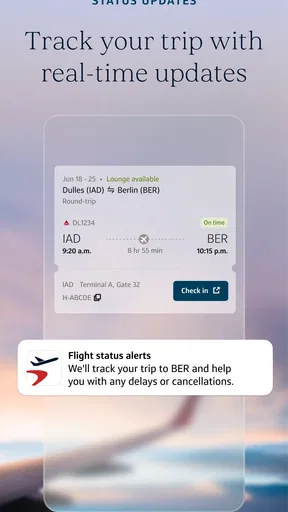
Beyond booking, Capital One Travel really shines in making your trip smooth sailing. It keeps all your booking details in one place. No need to dig through emails at the check-in counter. Just whip out your phone, and voila, all the info is there.
Rental Cars and More
Need a ride? The app’s got you covered with rental car bookings as well. It’s super convenient to compare prices and find a deal that fits your wallet. I loved how straightforward the process was, no hidden fees creeping up on you.
Customer Support
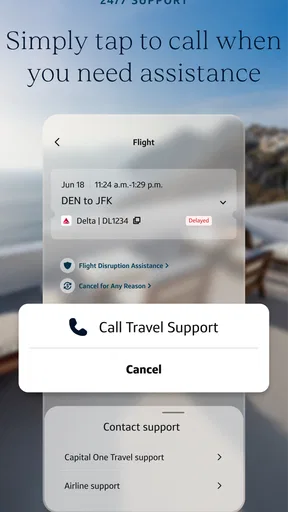
And let’s talk customer support. Because let’s face it, things can go sideways when traveling. The app offers access to 24/7 support, which is a huge peace of mind. I tested it out with a few queries, and the responses were prompt and helpful.
Final Thoughts
All in all, Capital One Travel is a solid travel companion. It takes the stress out of planning and keeps you in the loop with pricing insights. The ability to use rewards for booking sweetens the deal, and the app’s overall usability makes it a joy to use. If you’re planning a trip soon, give it a whirl and see how it can transform your travel experience. Happy travels!
Pros
- User-friendly interface for easy booking.
- Real-time price alerts save money.
- Comprehensive travel options available.
- Integrated with Capital One rewards.
- Secure transactions ensure peace of mind.
Cons
- Limited to Capital One cardholders.
- Occasional app crashes reported.
- Customer service response can be slow.
- Some features require a strong internet.
- Booking changes can incur fees.
FAQs for Capital One Travel
What is Capital One Travel and how does it work?
Capital One Travel is a travel booking platform designed for Capital One cardholders. It allows users to book flights, hotels, and rental cars using their credit card rewards. The app offers features like price prediction, price drop protection, and comparison tools to ensure users get the best deals while planning their trips.
Can I use Capital One Travel without a Capital One credit card?
No, Capital One Travel is specifically designed for Capital One cardholders. To access the features and benefits of the platform, you need to have a Capital One credit card. This integration allows users to maximize their rewards and take advantage of cardholder-exclusive discounts and services.
How does the price prediction feature in Capital One Travel benefit users?
The price prediction feature in Capital One Travel uses data analysis to forecast whether flight prices are likely to rise or fall. This helps users decide the best time to book their tickets. By providing these insights, the app aims to save users money and ensure they make informed booking decisions.
What are the pros and cons of using Capital One Travel?
Pros include access to exclusive cardholder rewards, price prediction and drop protection, and a user-friendly interface. However, the con is that it’s only available to Capital One cardholders, limiting access for those without a qualifying credit card. Some users may also find limited options compared to broader travel platforms.
Is there a mobile app for Capital One Travel, and what platforms is it available on?
Yes, Capital One Travel is accessible through a mobile app available for both Android and iOS platforms. Users can download the app from Google Play or the App Store. The app provides a seamless experience with features such as booking management, alerts, and easy access to customer support.


